Fileless Malware Attacks are rising sharply across global networks in 2026. These threats execute entirely within system memory, never writing files to a hard drive. They abuse legitimate built-in tools like PowerShell and Windows Management Instrumentation to perform harmful actions. Most begin through phishing emails or compromised website links. Because they leave no files behind, traditional antivirus software fails to detect them. Businesses worldwide face growing financial and data losses from these invisible cyber threats. Students studying cybersecurity must understand how these attacks operate. This 2026 detection guide covers how they work, why they evade standard defenses, and which detection and prevention strategies can effectively stop them.
How Fileless Malware Attacks Work in 2026
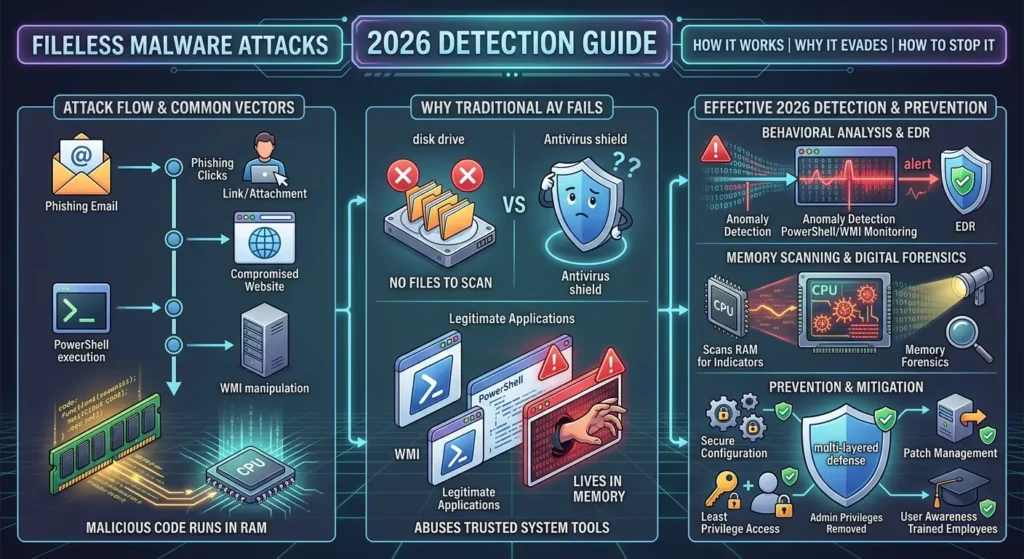
Fileless Malware Attacks operate through a unique mechanism that most modern security tools are not designed to handle. Instead of creating executable files, they inject malicious code into active system processes. They rely on PowerShell, WMI, and other built-in programs. This makes them a serious and growing threat in 2026.
- Attackers load harmful code directly into RAM. Since RAM clears when a computer restarts, attack evidence often disappears completely after a reboot.
- PowerShell is a scripting tool built into Windows. Hackers abuse it to run scripts that download further instructions from a remote server, all entirely in memory.
- WMI (Windows Management Instrumentation) lets programs interact with the operating system. Imagine a hacker using WMI like a remote control to execute commands deep inside your system.
- The typical attack chain starts when a user clicks a phishing link, which launches a script that runs in memory and connects to an attacker-controlled server.
- Because no new files land on the hard drive, standard file-scanning tools miss these threats completely. The attack blends in with normal system activity on the surface.
Common Entry Points for Fileless Malware Attacks
Cybercriminals rely on predictable weaknesses as starting points for attacks. Knowing these entry points helps students and security teams build stronger defenses. In 2026, the explosion of remote work and cloud adoption globally has widened the digital attack surface considerably. Recognizing how attacks begin is the first step toward effective protection.
- Phishing emails remain the leading entry point. A victim clicks a malicious link or opens a macro-enabled document, which immediately triggers a script hidden in memory.
- Malvertising involves fake advertisements that execute scripts when a user visits a compromised website. No clicking is required—simply loading the page can start an infection.
- Drive-by downloads happen when a browser visits a page with hidden exploit code. Imagine browsing a familiar news site that secretly injects a script into your browser’s running memory.
- Attackers exploit unpatched software vulnerabilities. An outdated browser plugin or operating system flaw becomes an open door for in-memory code injection without any user action.
Why Fileless Malware Attacks Evade Traditional Antivirus
Traditional antivirus software scans disk files for known malware signatures. Fileless Malware Attacks leave no files on disk, so signature-based tools find nothing to flag. This detection gap allows threats to operate invisibly inside targeted systems. Understanding why traditional tools fail helps students choose much better security solutions in 2026.
- Traditional antivirus depends on file signatures—unique code patterns extracted from known malware files. Since no files are ever created, the scanner never finds a match.
- Attackers use LOLBins (Living Off the Land Binaries), which are pre-installed, trusted programs already on Windows. Using a system’s own tools makes the attack appear completely normal.
- Encrypted or obfuscated scripts add another layer of difficulty. Even when a tool captures an in-memory script, decoding it requires significant time, expertise, and specialized software.
- Memory-resident execution means all evidence stays in RAM. Most antivirus tools do not scan RAM continuously the way they scan stored disk files for threats.
- Attackers blend into legitimate process activity. Imagine a hacker hiding inside a running browser process—security tools see a normal browser, not an intrusion happening in the background.
Top Detection Techniques for Fileless Malware Attacks
Detecting fileless malware attacks requires moving away from file-based analysis toward behavior monitoring. Modern tools examine what processes are doing, not just what files exist. Endpoint Detection and Response (EDR) platforms lead this approach. In 2026, behavioral analysis combined with memory scanning is the most effective detection strategy available globally.
- EDR tools monitor all running processes in real time, flagging suspicious behaviors like PowerShell spawning unexpected connections to external servers. Learn more about EDR in the prevention section below.
- Memory forensics captures and analyzes RAM contents to locate injected code. Tools like Volatility allow analysts to examine exactly what is running in memory at any given moment.
- PowerShell script-block logging records every command executed, even obfuscated ones. Enabling this across an organization gives security teams vital visibility into all script-based activity on every machine.
- SIEM platforms collect and correlate logs from across an entire network. Analysts can identify attack patterns that no single endpoint tool would detect on its own.
Prevention Strategies Against Fileless Malware Attacks
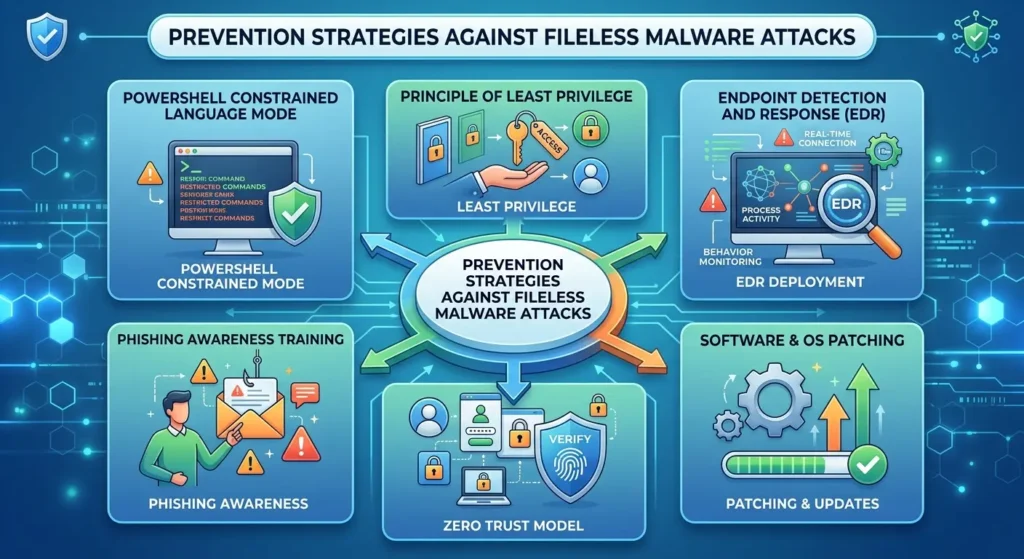
Preventing fileless malware attacks demands layered, proactive defenses rather than relying on a single security product. No tool alone provides complete protection. Organizations and cybersecurity students in 2026 must combine technical controls, user education, and strong policy enforcement. A defense-in-depth approach significantly reduces the risk of a successful memory-based intrusion.
- Enable PowerShell Constrained Language Mode to limit what scripts can execute within the system. This directly reduces the toolkit available to attackers using in-memory techniques.
- Apply the principle of least privilege across all user accounts. Imagine giving a new employee only the keys to their own office—not every room in the building.
- Deploy an EDR solution across all endpoints. EDR continuously monitors process behavior, providing security teams the visibility that traditional antivirus software simply cannot offer.
- Keep all software and operating systems fully patched and updated. Many fileless attacks exploit known vulnerabilities in unpatched applications to establish their initial foothold in a network.
- Implement a zero trust security model requiring every user and process to verify identity continuously before accessing any resource. This approach limits damage even after initial compromise.
- Conduct regular phishing awareness training for all users. Since phishing is the most common attack entry point, an educated workforce is a powerful and cost-effective preventive layer.
Future Trends in Fileless Malware Attacks for 2026
Fileless malware attacks are rapidly evolving as cybercriminals adopt increasingly sophisticated evasion techniques. Artificial intelligence now helps attackers craft smarter, more adaptive scripts automatically. In 2026, the rapid global growth of cloud services, remote work, and IoT devices has expanded the attack surface dramatically. Students must understand what lies ahead.
- AI-powered attack scripts can now adapt based on the defenses they encounter, learning from failed attempts. Static, rule-based security tools struggle significantly against these rapidly evolving threats.
- Cloud environments are increasingly targeted. Many organizations run operations entirely on cloud infrastructure, creating new surfaces for injecting memory-based threats into virtual machines and containerized services.
- Supply chain attacks embed malicious scripts inside trusted software updates. When a company installs a seemingly routine update, it may unknowingly activate a fileless payload in memory.
- Living-off-the-cloud techniques abuse legitimate services like OneDrive or Dropbox to host command-and-control scripts. Malicious traffic blends with normal cloud usage, making detection far more challenging for defenders.
Conclusion
These invisible cyber threats are among the most important topics for every cybersecurity student and business professional to understand in 2026. They exploit system memory, rely on legitimate tools, and bypass traditional antivirus defenses with ease. Effective detection requires behavioral analysis, EDR platforms, and memory forensics. Prevention demands layered strategies including least privilege, zero trust architecture, and phishing awareness training. As global attack surfaces expand through cloud adoption and remote work, proactive preparation is non-negotiable. Implement these strategies now to protect systems, data, and users before an attack occurs.
