
Wireless penetration testing is how security professionals answer a question every office, café, and hospital network quietly depends on: can someone sitting in the parking lot get into our network without ever touching a cable?
Why WiFi Is the Easiest Door Into a Building
Every other way into a corporate network usually requires either physical access or getting past a firewall watching the front door. WiFi skips both. A signal that leaks fifty meters past the office wall means an attacker never has to set foot inside the building, badge past reception, or plug into anything. They just need a laptop, a coffee, and enough patience to sit in range.
That’s exactly why wireless networks are tested separately from the rest of a company’s infrastructure the attack surface isn’t the same, and neither are the tools needed to secure it.
What Is Wireless Penetration Testing, Exactly?
Wireless penetration testing is the practice of deliberately attacking a WiFi network with permission the same way a real attacker would, to find weaknesses before someone with worse intentions does. This means testing the encryption protecting the network, the authentication process devices go through to join it, and the physical range the signal actually reaches.
It’s a specialized branch of penetration testing precisely because wireless attacks don’t look like typical network attacks. There’s no login page to brute-force in the usual sense the vulnerabilities live in radio signals, handshake protocols, and how devices decide which network to trust.
How Does Wireless Penetration Testing Actually Work?
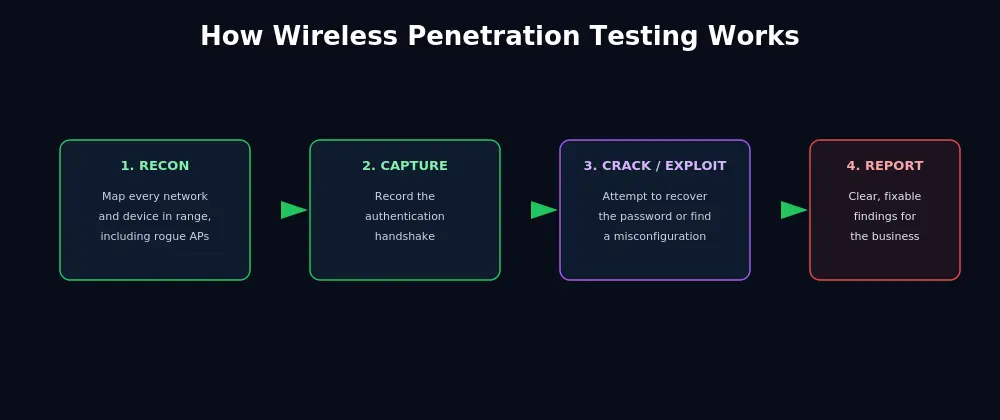
Step 1: Reconnaissance Finding Every Network in Range
Before touching anything, a tester maps out every wireless network broadcasting in range not just the official corporate WiFi, but every rogue access point, every guest network, and every device someone plugged in without approval. You’d be surprised how often this step alone turns up a network IT didn’t know existed.
Step 2: Capturing the Handshake
When a device connects to a WiFi network, it goes through a brief authentication exchange called a handshake. A tester captures this exchange not by breaking encryption in real time, but by recording the handshake data to analyze afterward.
Step 3: Cracking or Exploiting the Weakness
With the handshake captured, the tester attempts to recover the network’s password through offline cracking, or looks for a misconfiguration that skips the password requirement entirely. Weak, short, or commonly-used passwords fall quickly here which is exactly the point of testing it.
Step 4: Reporting What Was Found
The final step is the one that actually protects the business: a clear report showing what was breakable, how long it took, and specifically what needs to change. A test that finds a vulnerability but doesn’t translate it into a fixable action item hasn’t done its job.
Common Wireless Attacks Testers Actually Use
- WPA2 Handshake Cracking — capturing and attempting to recover the password from a network’s authentication handshake
- Evil Twin Attacks — setting up a fake access point with the same name as a legitimate network, tricking devices into connecting to the attacker instead
- Deauthentication Attacks — forcibly disconnecting a device from its network to force a fresh handshake that can be captured
- Rogue Access Points — an unauthorized device plugged into the network, broadcasting its own WiFi and bypassing existing security entirely
A Real Example: How an Evil Twin Attack Fools Employees
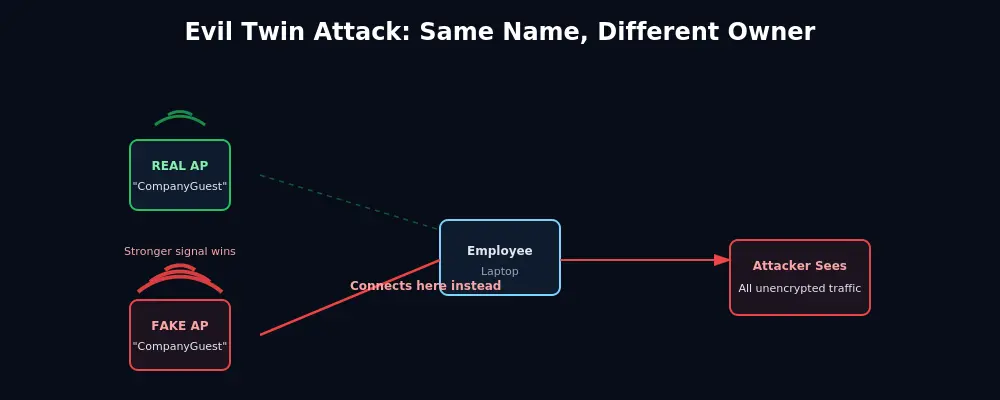
Picture a company’s WiFi network named “CompanyGuest.” A tester sets up a second access point broadcasting the exact same name, often with a stronger signal near a common area like a break room. A laptop or phone configured to auto-join “CompanyGuest” doesn’t know the difference it sees a familiar name and connects to whichever signal is strongest.
From there, every bit of unencrypted traffic that employee sends passes straight through the attacker’s device first. No malware, no phishing email, no password guessing just a name copied and a signal boosted. This is precisely why evil twin attacks are one of the first techniques taught in wireless penetration testing: the technical barrier to pulling it off is genuinely low, which is what makes it dangerous.
WiFi Security Protocols Compared
| Protocol | Released | Security Status | Notes |
|---|---|---|---|
| WEP | 1997 | Broken | Crackable in minutes with modern tools; should never be used |
| WPA | 2003 | Weak | Improved over WEP but has known vulnerabilities |
| WPA2 | 2004 | Generally strong | Still widely used; vulnerable mainly through weak passwords or KRACK-style implementation flaws |
| WPA3 | 2018 | Current standard | Adds stronger encryption and protection against offline password-guessing attacks |
Tools Wireless Pentesters Actually Use
| Tool | What It’s Used For |
|---|---|
| Aircrack-ng | Capturing handshakes and testing password strength |
| Kismet | Detecting and mapping wireless networks and devices in range |
| Wireshark | Analyzing captured wireless traffic in detail |
| Wifite | Automating common wireless attack workflows for testing |
How Businesses Defend Against Wireless Attacks
- Move to WPA3 wherever hardware supports it, since it closes several weaknesses WPA2 still carries
- Use long, unique passwords for WiFi networks — the single biggest factor in how quickly a handshake can be cracked
- Separate guest and internal networks completely, so a compromised guest connection can’t reach internal systems
- Monitor for rogue access points regularly, since employees plugging in unauthorized devices is a common, unintentional way networks get exposed
- Follow established guidance like NIST’s guidelines for securing wireless networks, which lays out a structured approach to wireless network security rather than ad-hoc fixes
Where Wireless Pentesting Fits Into a Cybersecurity Career
Wireless penetration testing is a specific, in-demand skill within the broader penetration testing field plenty of testers who are comfortable with web application security have never touched a wireless assessment, which makes this a genuine differentiator on a resume. Understanding modern protocols like WPA3, as defined by the Wi-Fi Alliance’s security specifications, alongside hands-on tool experience, is exactly the kind of practical skill that separates a certificate from real capability.
At Offenso, wireless penetration testing is one of the hands-on modules in the Offenso Certified Security Analyst course, built around exactly the tools and attack techniques covered in this guide.
Wireless Penetration Testing FAQ
Is wireless penetration testing legal? Yes, when performed with explicit written permission from the network owner. Testing a wireless network without authorization is illegal in most jurisdictions, regardless of intent.
How long does a wireless penetration test take? It depends on the size of the environment, but a typical assessment for a single office location usually takes a few days to a week, including reporting.
Can WPA3 networks still be attacked? WPA3 closes several major weaknesses in WPA2, but no protocol is unbreakable. Misconfiguration, weak passwords, and social-engineering-based attacks like evil twins remain effective regardless of the underlying protocol.
Do I need a special antenna to test wireless networks? Many wireless testing tools work with standard WiFi adapters, though testers often use adapters that support “monitor mode” and packet injection, which not all built-in laptop WiFi cards support out of the box.
What’s the difference between wireless penetration testing and a regular network pentest? A regular network penetration test typically assumes some form of existing access — physical or through the internet. Wireless penetration testing specifically tests the radio-based entry point itself, which requires different tools, techniques, and physical proximity considerations.