
What is SIEM? It’s the system that answers a question no single security tool can answer alone: out of everything happening across your entire network right now, what actually matters?
Imagine Trying to Watch 500 Security Cameras at Once
Picture a mall with 500 security cameras. One guard, one bank of screens, and a robbery happening on camera 347 while the guard happens to be looking at camera 12. That’s not a staffing problem — it’s a physical limit. No human can watch 500 feeds at once and reliably catch the one that matters.
Now replace cameras with logs: every login attempt, every file access, every firewall rule triggered, every antivirus alert, across every server, laptop, and device a company owns. A mid-sized company can generate millions of these events a day. Somewhere in that flood is the one login attempt from a hacked account. Finding it by hand is the security equivalent of the mall guard problem, multiplied by a thousand.
What Is SIEM, Exactly?
SIEM (pronounced “sim,” short for Security Information and Event Management) is software that watches all those camera feeds at once, on the guard’s behalf, and only interrupts them when something actually looks wrong.
It does this by pulling in log data from across an entire IT environment servers, firewalls, laptops, cloud services, applications and lining it all up in one place. Then it looks for patterns a human would never spot in real time: the same user account failing to log in from three countries within ten minutes, or a server suddenly sending data to an address it’s never talked to before.
How Does SIEM Actually Work?
Step 1: Collecting Logs From Everywhere
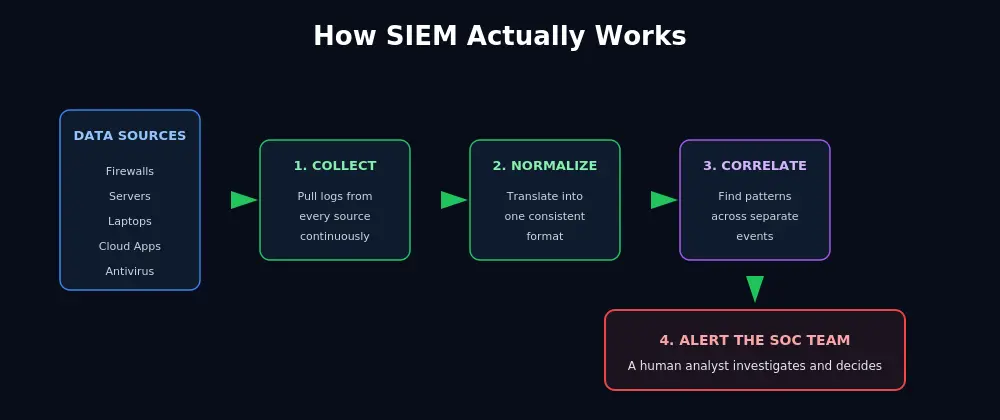
Every device and system on a network quietly generates logs — text records of what just happened. A SIEM connects to all of these sources and pulls that data into one central place, continuously, instead of leaving it scattered across hundreds of separate systems nobody’s watching.
Step 2: Making Sense of the Chaos (Normalization)
A firewall log and a Windows login log don’t speak the same “language” — they’re formatted completely differently. The SIEM translates all of it into a consistent format, so a login attempt from a laptop and a login attempt from a cloud server can be compared side by side instead of sitting in two incompatible formats nobody could cross-reference by hand.
Step 3: Correlating Events to Spot Real Threats
This is the actual intelligence layer. The SIEM doesn’t just store logs — it looks for relationships between them. One failed login isn’t interesting. Twenty failed logins on the same account within a minute, followed by a successful one from an unfamiliar country, is a pattern worth flagging immediately.
Step 4: Alerting the Security Team
When the SIEM identifies something that crosses its threshold for “worth a human’s attention,” it generates an alert — usually routed straight to a Security Operations Center (SOC), where an analyst investigates and decides whether it’s a real incident or a false alarm.
A Real Example: How a SIEM Catches an Attack at 2 AM
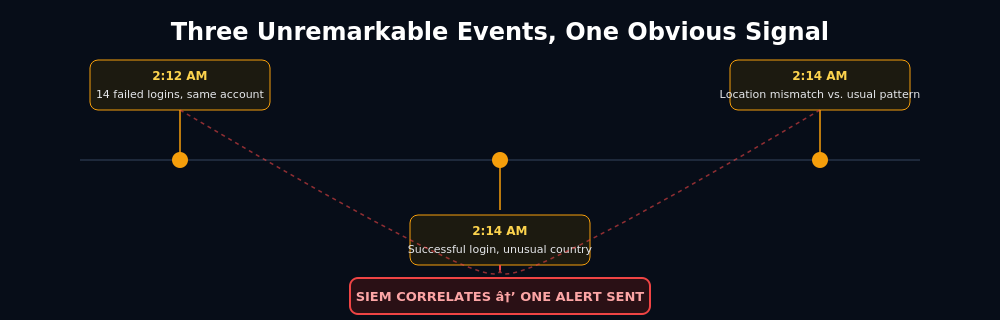
Here’s what this looks like in practice. At 2:14 AM, an employee’s credentials are used to log in from a country the company has never had staff in. On its own, a login is not automatically suspicious people travel, use VPNs, work odd hours.
But the SIEM also sees that the same account attempted (and failed) fourteen logins in the two minutes before that successful one. It cross-references the login location against the employee’s usual pattern and flags the mismatch. Within seconds, it correlates all three signals repeated failures, a successful login, and an unusual location into a single alert, rather than three disconnected, easy-to-miss log entries. A SOC analyst gets paged, reviews the correlated timeline in one screen instead of hunting through separate systems, and locks the account before any real damage happens.
That correlation step is the entire value of a SIEM in one example: it turns three separate, unremarkable-looking events into one obvious signal.
SIEM vs Firewall vs Antivirus vs EDR
A lot of beginners assume a SIEM replaces a firewall or antivirus. It doesn’t it sits above them, reading what they report.
| Tool | What It Actually Does | Scope |
|---|---|---|
| Firewall | Blocks or allows network traffic based on rules | Network perimeter |
| Antivirus | Detects and removes malicious software on a device | Individual endpoints |
| EDR (Endpoint Detection & Response) | Monitors and responds to threats on individual devices in more depth than antivirus | Individual endpoints |
| SIEM | Collects and correlates logs from all of the above (and more) to spot patterns none of them can see alone | Entire IT environment |
None of these tools are competing with each other a mature security setup runs all of them together, with the SIEM acting as the layer that connects what everything else is reporting.
Popular SIEM Tools You’ll Hear About
| Tool | Type | Known For |
|---|---|---|
| Splunk | On-prem / cloud | Powerful search and correlation; industry standard in many SOCs |
| IBM QRadar | On-prem / hardware appliance | Strong threat intelligence integration |
| Microsoft Sentinel | Cloud-native | Deep integration with Microsoft 365 and Azure environments |
| Elastic Security (SIEM) | Open-source / cloud | Built on the widely-used Elastic Stack |
| LogRhythm | On-prem / cloud | Focus on compliance reporting and mid-market deployments |
You don’t need hands-on experience with all of these to start a SOC career, but recognizing what each one does — and that Splunk in particular shows up constantly in job postings is genuinely useful groundwork.
Why Companies Actually Invest in SIEM
- Faster detection. Correlating events automatically catches patterns days or weeks before a manual review would.
- Compliance requirements. Regulations in healthcare, finance, and other regulated industries often require centralized log monitoring and retention a SIEM is usually the tool that satisfies this.
- Forensic investigation. After a breach, a SIEM’s historical log data lets a team reconstruct exactly what happened and when, which is critical for containing damage and reporting accurately.
- Fewer blind spots. Without a SIEM, security teams are stuck manually checking separate tools, which means gaps between systems become the easiest place for an attacker to hide.
The Honest Challenges of Running a SIEM
SIEM isn’t a “set it up and forget it” tool, and it’s worth understanding why so many organizations struggle with it:
- Alert fatigue. A poorly tuned SIEM generates so many alerts that analysts start ignoring them which defeats the entire purpose.
- Cost and complexity. Enterprise SIEM licensing and the infrastructure to run it can be expensive, and setup requires real expertise to configure correlation rules correctly.
- Constant tuning required. A SIEM is only as good as the rules and log sources feeding it — it needs continuous adjustment as a company’s systems and threats evolve.
- Skilled analysts still required. The tool surfaces the pattern; a trained person still has to interpret it correctly and decide what to do. According to NIST’s guidance on log management, effective log analysis depends as much on skilled personnel and clear processes as on the technology itself.
Where SIEM Fits Into a Cybersecurity Career
SIEM knowledge sits at the center of the SOC analyst role — it’s the tool a SOC analyst lives inside for most of their shift. Being comfortable reading correlated alerts, tuning rules to reduce noise, and following OWASP’s logging best practices to ensure the right data even reaches the SIEM in the first place are core, practical skills not theoretical ones.
At Offenso, SIEM and log correlation are hands-on components of the Offenso Certified SOC Expert course, built specifically around the tools and workflows a working SOC analyst uses every day.
What Is SIEM FAQ
What is SIEM in cyber security? SIEM in cyber security is software that collects, normalizes, and correlates log data from across an entire IT environment to detect security threats that would be invisible to any single tool on its own.
Is SIEM the same as a SOC? No. A SOC (Security Operations Center) is the team and process; SIEM is the tool that team uses. A SOC could technically operate without a SIEM, but nearly all modern SOCs are built around one.
Do small businesses need a SIEM? Not always at the same scale as an enterprise. Many small businesses use cloud-based, lighter-weight SIEM options or managed security services instead of running full enterprise SIEM infrastructure themselves.
How long does it take to learn SIEM tools? Basic proficiency with a tool like Splunk’s search and dashboard features can be picked up in weeks with focused, hands-on practice. Mastering correlation rule-writing and full incident investigation workflows takes considerably longer and benefits from structured, guided training.
Can SIEM stop an attack by itself? On its own, traditional SIEM detects and alerts rather than blocking anything automatically. Some modern platforms add SOAR (Security Orchestration, Automation and Response) capabilities that can trigger automatic responses, but a human analyst is still central to most SIEM-driven investigations.