
If you’ve spent even a week exploring ethical hacking, you’ve heard the name Nmap. It appears in every penetration testing course, every CEH study guide, and every “tools every hacker uses” list on the internet. But most beginners learn Nmap backwards they memorise commands before they understand what the tool is actually doing. That leads to running scans without knowing how to interpret the results, or worse, running the wrong scan at the wrong time.
This guide takes a different approach. Before you type a single command, you need to understand the concepts behind Nmap how it thinks, what it’s measuring, and why those measurements matter in a real ethical hacking workflow.
What Is Nmap and Why Has It Survived 30 Years?
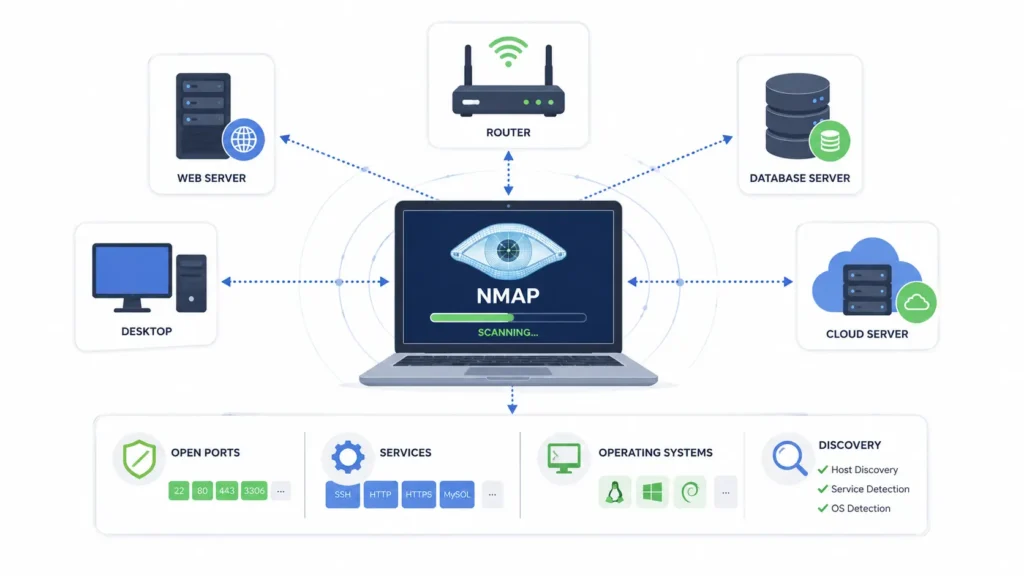
Nmap, short for Network Mapper, is a free, open-source tool created by security researcher Gordon Lyon (known online as Fyodor) in 1997. In an industry where tools come and go within a few years, Nmap has remained the gold standard for network reconnaissance for nearly three decades. That longevity isn’t nostalgia it’s because the fundamental problem Nmap solves hasn’t changed: before you can test a system’s security, you need to know what’s there.
At its core, Nmap works by sending specially crafted packets to a target and analysing the responses. The way a system responds or doesn’t respond to different types of network probes reveals a surprising amount of information: which devices are online, which services are running, what software versions are in use, and even what operating system the target is likely running. Think of it as sonar for a network. You send out a signal the echo tells you what’s in the water.
Important: Nmap must only be used on systems you own or have explicit written permission to scan. Unauthorised scanning is illegal in most countries. Always practice
in lab environments like TryHackMe, HackTheBox, or your own home lab.
Where Nmap Fits in the Ethical Hacking Process
Ethical hacking follows a structured methodology. Whether you’re using the Cyber Kill Chain, PTES (Penetration Testing Execution Standard), or EC-Council’s CEH framework, the process always begins the same way: reconnaissance. You cannot exploit what you don’t know exists. This is one of the fundamental concepts taught in a cyber security course in malappuram, where students learn how tools like Nmap help security professionals discover and assess network assets before moving on to vulnerability analysis and penetration testing.Ethical hacking follows a structured methodology. Whether you’re using the Cyber Kill Chain, PTES (Penetration Testing Execution Standard), or EC-Council’s CEH framework, the process always begins the same way: reconnaissance. You cannot exploit what you don’t know exists.
Nmap sits firmly in the first two phases of any engagement:
Reconnaissance (Discovery): Finding out which hosts are alive on a network. At this stage you’re not interested in vulnerabilities — you’re simply building a list of targets. Which IP addresses responded? Which devices are online?
Enumeration (Scanning): Going deeper into each discovered host. Which ports are open? What services are listening on those ports? What versions are running? This is where Nmap transforms from a simple host-discovery tool into a full intelligence-gathering engine.
The output of a thorough Nmap scan is essentially the blueprint of an attack surface the complete map of everything exposed on a target network. Every open port is a potential entry point. Every identified service version is a potential CVE waiting to be looked up.
Understanding Ports: The Concept Behind Every Nmap Scan
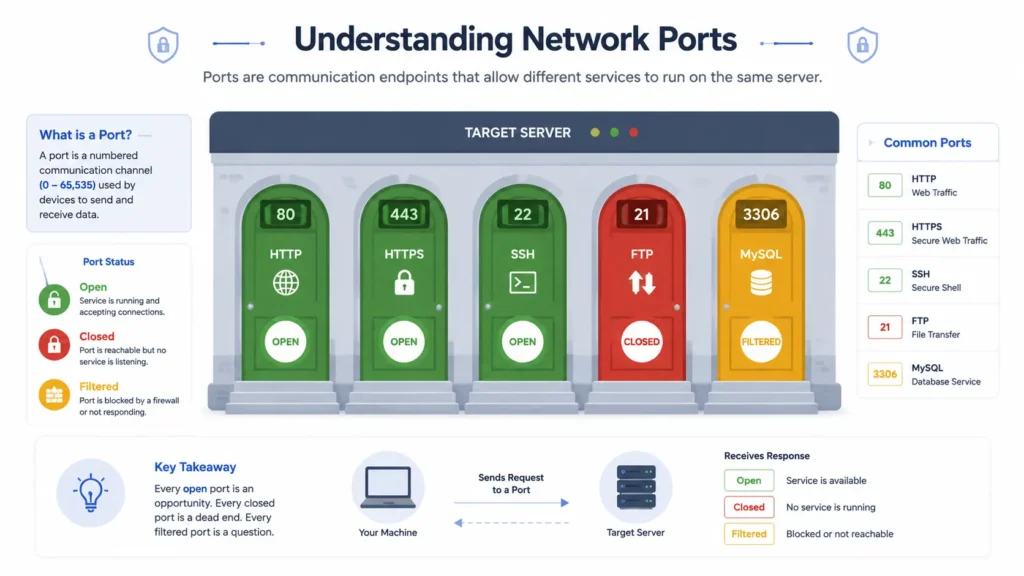
To understand why Nmap matters, you need to understand ports.
Every computer connected to a network communicates through ports numbered channels (0 to 65,535) that allow different services to run simultaneously on the same
machine. Port 80 handles web traffic (HTTP). Port 443 handles encrypted web traffic (HTTPS). Port 22 handles SSH (remote terminal access). Port 21 handles FTP (file transfers).
When Nmap scans a target, it’s essentially knocking on thousands of these doors and listening to what happens. A door can respond in one of three ways:
- Open: Something is behind the door and it answered. A service is actively listening on this port.
- Closed: The door exists, but nothing is behind it. The port is reachable but no service is running.
- Filtered: The door didn’t respond at all. A firewall is likely blocking the probe, and Nmap cannot determine the state.
For an ethical hacker, open ports are the most interesting. Each open port represents a running service and every service is a potential vulnerability if it’s outdated,
misconfigured, or exposed unnecessarily.
Scan Types: What Nmap Is Actually Doing Under the Hood
Not all Nmap scans are the same. Different scan types use different techniques, and understanding the difference helps you choose the right approach for your situation.
TCP Connect Scan
This is the most basic type. Nmap attempts to complete a full TCP three-way handshake (SYN → SYN-ACK → ACK) with each port, exactly the way a normal application would connect. If the handshake completes, the port is open. This type doesn’t require special privileges, but it’s easily logged by the target system because a full connection is made.
SYN Scan (Half-Open Scan)
Often called a “stealth scan,” the SYN scan sends a SYN packet but deliberately never completes the handshake. When the target responds with SYN-ACK (confirming the port is open), Nmap sends a RST (reset) packet to close the connection before it’s established. Because no full connection is ever made, many older logging systems won’t record it. It requires root/administrator privileges to run but is faster and quieter than a full TCP connect scan.
UDP Scan
While TCP handles most internet traffic, many critical services run on UDP the other major transport protocol. DNS (port 53), SNMP (port 161), and DHCP (port 67/68) all use UDP. UDP scanning is significantly slower than TCP because UDP has no built-in acknowledgment mechanism Nmap has to wait for a timeout to determine if a port is filtered versus simply slow to respond. Beginners often skip UDP scans entirely which is exactly why UDP ports are a common source of real-world findings.
Version Detection Scan
Once Nmap knows a port is open, version detection goes a step further: it actively probes the service to identify not just what’s running, but exactly which version. This is where reconnaissance becomes actionable intelligence. Knowing that port 22 is open tells you SSH is running. Knowing it’s running OpenSSH 7.2p2 tells you which specific CVEs to check. Version detection is what separates a surface-level scan from a professional reconnaissance report.
OS Detection
Through a technique called TCP/IP stack fingerprinting, Nmap can make an educated guess about a target’s operating system. Different operating systems implement TCP/IP slightly differently window sizes, TTL values, and responses to unusual packets all vary in characteristic ways. Nmap compares observed behaviour against a database of known OS fingerprints to identify the likely OS and version. This matters because vulnerability exploitation is often OS-specific.
NSE: The Feature That Makes Nmap a Platform, Not Just a Scanner
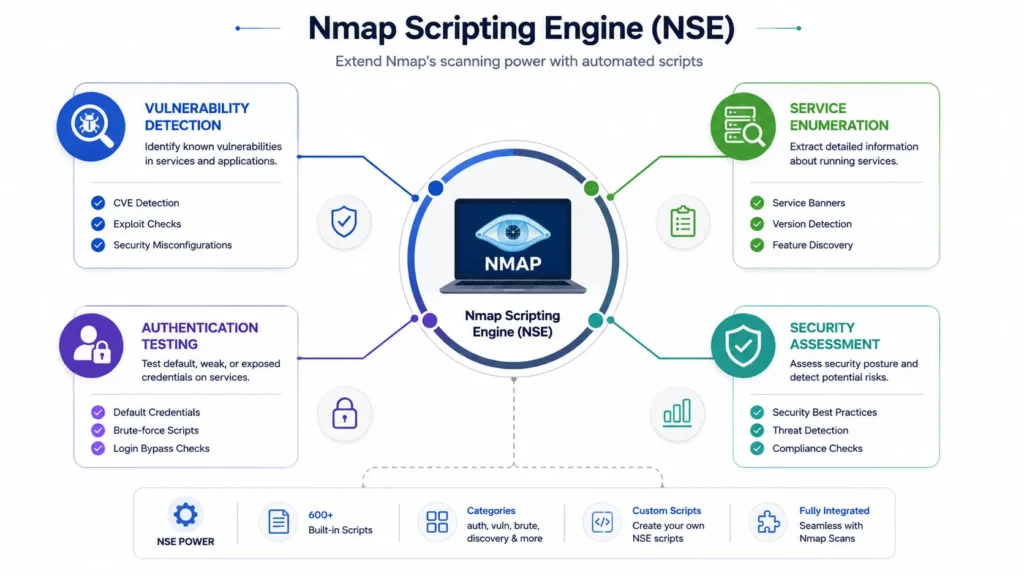
Most beginners use Nmap as a port scanner and stop there. The professionals use it as a security testing platform thanks to the Nmap Scripting Engine (NSE).
NSE allows Nmap to run automated scripts against discovered hosts and services. These scripts extend Nmap’s capabilities far beyond scanning into areas like:
- Vulnerability detection — testing for known CVEs in identified service versions
- Authentication testing — checking for default credentials on services like FTP, Telnet, and databases
- Service enumeration — extracting detailed information from HTTP servers, DNS resolvers, SMB shares, and more
- Brute-force testing — attempting common passwords against login services
Nmap ships with over 600 built-in scripts organised into categories: auth, vuln, discovery, brute, malware and others. The vuln category alone can surface critical
findings like EternalBlue (the SMB vulnerability behind the WannaCry ransomware attacks) on unpatched systems.
NSE is why experienced penetration testers say Nmap isn’t just a scanner it’s a framework.
Reading Nmap Results: What to Actually Do with the Output
Running a scan is only half the job. The real skill is knowing what the output means and what to do next.
When you receive Nmap results, work through them with these questions:
Which services are running that shouldn’t be? An FTP server or Telnet port open on a machine that has no legitimate need for it is an immediate finding. Unnecessary open ports expand the attack surface without any business justification.
Are any service versions outdated? Cross-reference identified versions against public vulnerability databases like NVD (National Vulnerability Database) or CVEDetails.com. An outdated Apache version, an unpatched SMB service, or an old version of OpenSSL can each represent critical exploitable vulnerabilities.
What does the combination of open ports tell you? A machine running SSH (22), HTTP (80), and MySQL (3306) is likely a web server with a backend database a common and interesting target profile. Ports don’t just represent individual services; together they describe the role and nature of the system.
What should you scan next? Nmap results are a starting point, not a conclusion. Each identified service points toward the next, more specialised tool Nikto for web server analysis, enum4linux for SMB shares, sqlmap for database-connected web applications.
The Bigger Picture: Nmap as a Way of Thinking
The most important thing Nmap teaches beginners isn’t a command it’s a mindset. Good ethical hackers approach every target the same way: systematically, methodically, and with curiosity about what’s exposed. Nmap formalises that approach. It forces you to ask the right questions before jumping to exploitation.
Every open port is a question. Every service version is a clue. Every filtered response tells you something about the defences in place. Learning to read that information and knowing what to do with it is the foundation on which every other skill in ethical hacking is built.