
Splunk SIEM is where most beginners get their first real confusion about Splunk, and it’s worth clearing up before anything else: plain Splunk and Splunk SIEM are not the same product.
Splunk vs Splunk SIEM: Why They’re Not the Same Thing
Regular Splunk is a general-purpose search and analytics platform. You can point it at logs, sales data, or website traffic, and it will index and search all of it the same way. It has no built-in understanding of what a security threat looks like it just finds what you ask it to find.
Splunk SIEM refers to Splunk Enterprise Security (often shortened to “Splunk ES”), a separate premium application that runs on top of regular Splunk. It adds the parts a security team actually needs: pre-built correlation rules, threat intelligence feeds, risk scoring, and dashboards built specifically for investigating incidents rather than generic data exploration. If our earlier guide on SIEM explained what a SIEM does in general, this is what that concept looks like once Splunk builds it out into a real product.

What Is Splunk SIEM, Exactly?
Splunk SIEM is the security-focused layer added to Splunk’s core search platform, turning general log data into structured threat detection. Where base Splunk answers “show me this data,” Splunk SIEM answers a harder question: “tell me what in this data actually matters right now.”
That distinction is the entire reason Splunk SIEM exists as a separate product rather than a feature toggle. Security teams don’t just need to search logs they need the system to actively watch for patterns and surface the handful of events worth a human’s attention out of millions that aren’t.
7 Splunk SIEM Features Every SOC Analyst Should Know
- Enterprise Security (ES) App — the actual application SOC analysts work inside daily, built around security use cases rather than generic search.
- Correlation Searches — pre-built and custom rules that automatically scan incoming data for suspicious patterns, running continuously in the background.
- Risk-Based Alerting — instead of firing one alert per rule match, Splunk SIEM assigns risk scores to users and systems, only escalating once accumulated risk crosses a threshold — a major fix for alert fatigue.
- Notable Events Dashboard — a central queue where flagged incidents land for an analyst to review, rather than digging through raw search results.
- Asset and Identity Framework — maps raw IP addresses and usernames back to real assets and people, so an alert reads “Finance laptop, John’s account” instead of a meaningless IP string.
- Threat Intelligence Integration — pulls in external threat intelligence feeds and automatically checks incoming data against known malicious indicators, aligned with frameworks like MITRE ATT&CK.
- Investigation Workbench — a workspace for building a timeline of an incident, attaching evidence, and documenting findings without leaving the platform.
How Splunk SIEM Correlation Searches Actually Work
A correlation search is a saved query that runs on a schedule, continuously checking new data against a specific pattern. Instead of an analyst manually searching for “multiple failed logins followed by a success,” the correlation search runs that exact check every few minutes, automatically, forever.
When a correlation search finds a match, it doesn’t just log the result quietly it can generate a notable event, assign risk points to the account or system involved, and route the finding straight to the analyst queue. This is the mechanical core of what separates Splunk SIEM from plain Splunk: the platform is actively looking, not waiting to be asked.
A Real Example: Splunk SIEM Flagging a Compromised Account
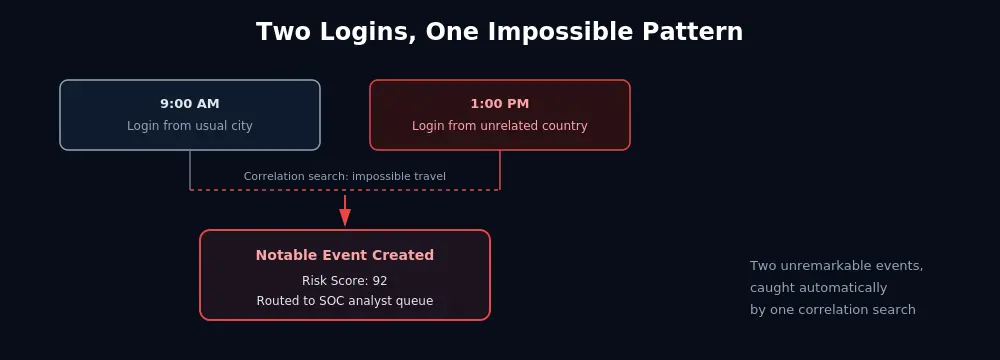
An employee’s account logs in from its usual city at 9 AM, as always. Four hours later, the same account authenticates again this time from a country the company has no operations in. On their own, neither event is unusual enough to investigate manually.
A correlation search built around impossible travel two logins from geographically distant locations in a timeframe no real person could physically cover catches the pattern instantly. Splunk SIEM assigns risk points to the account, generates a notable event, and an analyst sees a single flagged item instead of two disconnected login records buried among thousands of others that day. This is precisely the gap between base Splunk (which could technically find this too, if someone knew to search for it) and Splunk SIEM (which finds it automatically, every time, without anyone asking).
Splunk SIEM vs Other SIEM Platforms
| Platform | Built On | Known For |
|---|---|---|
| Splunk SIEM (Enterprise Security) | Splunk’s core platform | Deep customization, strong correlation search flexibility |
| Microsoft Sentinel | Azure cloud | Tight integration with Microsoft 365 environments |
| IBM QRadar | Dedicated appliance | Strong out-of-the-box threat intelligence |
| Elastic Security | Elastic Stack | Open-source flexibility, lower entry cost |
Splunk SIEM’s main strength is that it inherits the full power of Splunk’s search language underneath it — an analyst who already knows SPL from working with regular Splunk has a real head start when they move into the security-specific layer.
Getting Started with Splunk SIEM as a Beginner
- Learn base Splunk and SPL first — Splunk SIEM builds directly on top of these skills, so this isn’t a step to skip
- Study pre-built correlation searches — Splunk ships with a library of them, and reading how they’re constructed teaches pattern-building faster than writing from scratch
- Get comfortable with the Notable Events workflow — this is where an analyst spends most of their actual working time, not in raw search
- Practice with sample security datasets — Splunk provides datasets specifically built for learning security use cases, separate from general-purpose sample data
- Read through the official documentation — Splunk’s Enterprise Security documentation covers the platform’s actual feature set in more depth than any third-party summary, including this one
Where Splunk SIEM Fits Into a SOC Career
Splunk SIEM experience is one of the more specific, resume-strengthening skills a SOC analyst can build, precisely because plenty of candidates know Splunk in general but haven’t worked inside the Enterprise Security layer specifically. Being able to describe how a correlation search actually works — not just that alerts exist is the kind of detail that separates a strong interview answer from a vague one. If you want the tool-search fundamentals before this layer, our Splunk for logging guide covers the base skills this builds on.
At Offenso, Splunk SIEM concepts are woven into the hands-on portions of the Offenso Certified SOC Expert course, alongside the correlation and investigation workflows a working SOC analyst uses daily.
Splunk SIEM FAQ
Is Splunk SIEM the same as Splunk Enterprise Security? Yes. “Splunk SIEM” is the common shorthand people use for Splunk Enterprise Security (Splunk ES), the security-focused application built on top of the core Splunk platform.
Do I need to learn regular Splunk before Splunk SIEM? Yes, practically speaking. Splunk SIEM runs on top of core Splunk search skills (SPL), so trying to learn the security layer without that foundation makes everything harder than it needs to be.
Is Splunk SIEM expensive? Splunk Enterprise Security is a premium, paid add-on separate from base Splunk licensing, and pricing is typically based on data volume and negotiated per organization rather than published as a flat rate.
Can small businesses use Splunk SIEM? It’s possible, but Splunk SIEM is generally built and priced for mid-size to large security teams. Smaller organizations often start with lighter-weight or cloud-native SIEM options instead.
What is a correlation search in Splunk SIEM? A correlation search is a saved, scheduled query that continuously checks incoming data for a specific suspicious pattern, automatically generating an alert or notable event when it finds a match.